
Description
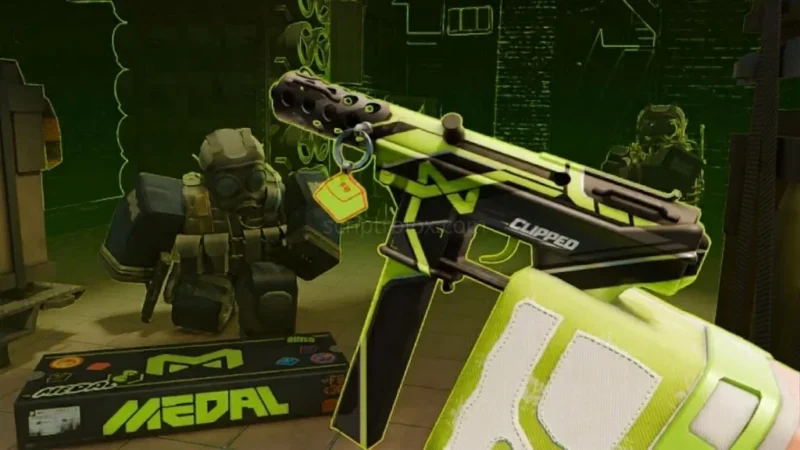
The BloxStrike ISTL Hub Script is an open-source Roblox utility designed for BloxStrike, featuring a broad range of aiming, combat, and visual customization options. Its advertised tools include Legit Aimbot, Silent Aim, Triggerbot, Auto Wallbang, Backtrack, Anti-Aim, and configurable hitboxes. These options bring several targeting and combat-related settings together in one interface.
The BloxStrike ISTL Hub Script also includes player ESP, health bars, distance indicators, weapon and inventory displays, bullet tracers, hit markers, custom FOV, No Recoil, and No Spread. The BloxStrike ISTL Hub Script is marked keyless and mobile-friendly, with multiple executors listed as tested options. However, user comments report ESP problems and at least one report says the script is not working, so current feature reliability remains uncertain.
Features
- Legit Aimbot – Includes smoothing and configurable FOV settings.
- Silent Aim – Provides an alternative targeting option.
- Triggerbot / Auto Fire – Automatically fires when supported targeting conditions are met.
- Wall Check – Includes a visibility-check option.
- Auto Wallbang – Advertises a wall-penetration-related feature.
- Target Bone Selection – Supports Head, Neck, UpperTorso, and HumanoidRootPart.
- Quick Scope – Provides a quick-scoping option.
- Auto Scope and Auto Stop – Adds automated aiming and movement controls.
- Multipoint and Multi Hitbox – Provides additional target-selection options.
- Hit Chance and Damage Settings – Includes minimum hit chance, minimum damage, and override controls.
- Anti-Aim – Includes pitch and backward-facing options.
- 360 Mode – Provides an additional aiming mode.
- Backtrack – Includes history-based targeting options and ghost visuals.
- Player ESP – Displays boxes, names, health bars, distance, head dots, weapons, and inventory.
- Offscreen Arrows – Shows indicators for offscreen targets.
- Chams and ESP Preview – Provides additional target-visibility customization.
- Bullet Tracers and Impacts – Adds visual indicators for shots and bullet impacts.
- Hit Markers and Hit Sounds – Provides feedback options for hits.
- Kill Effects – Lists effects such as lightning, rockets, and other visual animations.
- Tactical ESP – Includes grenade warnings, smoke zones, and related indicators.
- Movement Utilities – Includes Bunny Hop, No Fall Damage, Quick Stop, Auto Peek, and Fake Duck.
- Camera Options – Includes Third Person and custom FOV settings.
- Visual Settings – Provides options for weather, skybox, brightness, smoke, and flash effects.
- Weapon Visual Controls – Includes No Recoil and No Spread options.
- Config Settings – Provides configuration options for the available features.
- Keyless Access – The listing identifies the script as keyless.
- Mobile-Friendly – The page carries a mobile-friendly tag.
Why Use the ISTL Hub Script?
BloxStrike is a combat-focused Roblox experience where aiming, target visibility, and weapon control can affect gameplay. ISTL Hub groups a wide range of targeting and visual options into one interface, allowing users to explore different settings from a single place.
Aimbot, Silent Aim, Triggerbot, and hitbox controls cover the targeting category, while ESP, Chams, Offscreen Arrows, and Bullet Tracers focus on visual information. Additional settings include movement controls, camera customization, tactical indicators, and weapon-related options.
The listing identifies ISTL Hub as open-source, keyless, and mobile-friendly. However, these labels do not guarantee that every feature is currently functional or compatible with every executor.
Script Preview
loadstring(game:HttpGet("https://raw.githubusercontent.com/LSSOPS/OpenSource/refs/heads/main/ISTLHub_BloxStrikeV.lua"))()How to Use This Script
Open Your Executor
Launch a supported executor and attach it to a running Roblox session.
Copy the Script
Click the Copy button above. The full loadstring is placed on your clipboard instantly.
Paste & Execute
Paste it into the executor and hit Execute. The hub window opens inside the game.
Features
Tested with
Compatible Executors
Similar Scripts
 6
10 hours ago
No Key
 8
3 days ago
No Key
16
4 days ago
No Key
26
4 days ago
No Key
12
2 weeks ago
No Key
12
2 weeks ago
No Key
Comments
0
No comments yet. Be the first to comment!