

Description
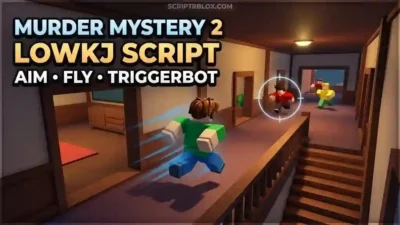
Murder Mystery 2 Lowkj Script is a keyless Roblox utility focused on movement, player controls, emotes, aiming, and combat-related features. The script includes Movement, Emotes, Players, Aim, Shoot Murderer, Fling Murderer, Walk Speed, Jump Power, Fly, Fly Speed, Triggerbot, Reaction Delay, Accuracy, and Aim Prediction.
Movement provides additional movement-related controls, while Emotes adds options for managing available emotes. Players and Aim focus on player interaction and targeting, while Shoot Murderer and Fling Murderer provide additional murderer-focused options.
The script also includes Walk Speed, Jump Power, Fly, and Fly Speed for movement customization. Triggerbot, Reaction Delay, Accuracy, and Aim Prediction provide additional aiming and combat-related controls.
Overall, Murder Mystery 2 Lowkj Script is a keyless utility combining movement, emotes, player controls, aim features, combat options, and customizable movement settings.
Features
- Movement – Provides additional movement-related controls.
- Emotes – Provides options for managing available emotes.
- Players – Provides player-related controls and options.
- Aim – Provides the listed aiming functionality.
- Shoot Murderer – Provides an option focused on shooting the murderer.
- Fling Murderer – Provides an option for the listed murderer-flinging action.
- Walk Speed – Allows customization of the player’s walking speed.
- Jump Power – Allows customization of jump power.
- Fly – Provides a flying movement option.
- Fly Speed – Allows customization of flying speed.
- Triggerbot – Provides an automatic trigger option for targeting.
- Reaction Delay – Provides control over the listed reaction delay setting.
- Accuracy – Provides an accuracy-related aiming setting.
- Aim Prediction – Provides an option for predicting target movement while aiming.
- Keyless Access – The script is listed without a traditional key requirement.
- Xeno Support – Xeno is listed as a supported executor.
- Volt Support – Volt is listed as a supported executor.
- Potassium Support – Potassium is listed as a supported executor.
- Wave Support – Wave is listed as a supported executor.
- Delta Support – Delta is listed as a supported executor.
- Solara Support – Solara is listed as a supported executor.
- Opiumware Support – Opiumware is listed as a supported executor.
- Codex Support – Codex is listed as a supported executor.
- MacSploit Support – MacSploit is listed as a supported executor.
- Vega X Support – Vega X is listed as a supported executor.
- Velocity Support – Velocity is listed as a supported executor.
- Why Use the Murder Mystery 2 Lowkj Script?
Murder Mystery 2 is built around movement, player interaction, roles, and fast reactions, and the Lowkj Script combines several related utilities into one keyless setup.
Movement, Walk Speed, Jump Power, Fly, and Fly Speed provide different movement customization options. Emotes and Players add additional gameplay controls, while Aim, Triggerbot, Accuracy, and Aim Prediction focus on targeting and combat-related settings.
For murderer-focused gameplay, Shoot Murderer and Fling Murderer provide the specific options listed on the script page. Reaction Delay adds another configurable aiming-related setting.
Overall, Murder Mystery 2 Lowkj Script is focused on movement, aiming, player controls, combat utilities, emotes, and keyless access.
Script Preview
loadstring(game:HttpGet("https://raw.githubusercontent.com/xywarch/wxxcute/refs/heads/main/Lowkj"))()How to Use This Script
Open Your Executor
Launch a supported executor and attach it to a running Roblox session.
Copy the Script
Click the Copy button above. The full loadstring is placed on your clipboard instantly.
Paste & Execute
Paste it into the executor and hit Execute. The hub window opens inside the game.
Features
Tested with
Compatible Executors
Similar Scripts
 356
1 week ago
No Key
 37
2 weeks ago
No Key
24
2 weeks ago
No Key
77
4 weeks ago
No Key
39
4 weeks ago
No Key
 23
4 weeks ago
No Key
Comments
0
No comments yet. Be the first to comment!